
4 Best Video APIs for Developers (2026 Mid-Year Update)
We compared Renderly, Shotstack, Creatomate, and JSON2Video on price, speed, and DX. Subscription costs run $0.10 to $0.84 per minute at 1080p.

Founder
You need to generate videos programmatically. Maybe it's product demos, personalized outreach, social content, or training videos. You've done the research. You know you need a video API.
But which one?
I've spent the last year integrating with, testing, and building on top of most of the major video APIs. Some are great. Some look great until you hit scale. And some are genuinely impressive but come with trade-offs nobody mentions in their marketing pages.
Here's my honest breakdown of the 4 best video APIs for developers in 2026, with real pricing, actual code examples, and the gotchas I wish someone had told me about. This is the mid-year refresh: I've reverified every price against each provider's live pricing page as of June 2026, and a couple of them changed since the start of the year.
Key Takeaways
- The AI video generator market is projected at $946.4 million in 2026, on track to $3.44 billion by 2033 (Grand View Research, 2026)
- Subscription cost per minute at 1080p ranges from $0.10 (Renderly) to $0.84 (Creatomate Essential), an 8x spread for the same output
- Shotstack is the fastest renderer at ~20 seconds per minute; Renderly is the cheapest at any volume
- Creatomate raised its monthly prices in 2026, and JSON2Video added a new $16.95/mo Hobby tier
What Counts as a Video API in 2026?
The AI video generator market is projected at $946.4 million in 2026 and is forecast to reach $3.44 billion by 2033, a 20.3% compound annual growth rate (Grand View Research, 2026). That growth has split the "video API" space into two distinct worlds, and confusing them wastes a lot of evaluation time. Our developer's complete guide to video APIs maps the full landscape, including the three competing architectures and what each one costs.
-
Programmatic video rendering APIs. You define video content via JSON, templates, or code. The API renders the final video. Think product demos, marketing videos, data-driven content.
-
AI video generation APIs. You provide a text prompt, and AI generates footage from scratch. Think Sora, Runway, Kling.
This guide covers category 1: APIs for template-based, data-driven video generation at scale. If you're looking for text-to-video AI, that's a different article. (Not sure which fits your use case? We wrote a full breakdown of template-based vs AI-generated video.)
Here are the four platforms we're comparing:
| Platform | Pricing Model | Starting Price | Best For |
|---|---|---|---|
| Renderly | PAYG or subscription | $0.20/min PAYG or $29/mo | Cost-effective scale |
| Shotstack | Subscription or PAYG | $39/mo or $0.30/min | Fast rendering speed |
| Creatomate | Subscription (credit-based) | $54/mo | Visual template design |
| JSON2Video | Subscription or prepaid | $16.95/mo or $49.95 prepaid | Simple automation |
1. Renderly: Best for Cost-Effective Video Generation at Scale
Pricing: $0.20/min PAYG, $29/month Creator, or $99/month Business at $0.10/min effective SDKs: REST API (works with any language) Template System: JSON-configurable with isDynamic overlay replacements Rendering: Cloud-based with auto-scaling
I'll be upfront: this is our platform. But I'm including it in this comparison because I genuinely believe the pricing and developer experience hold up against anything else on this list. You can judge for yourself.
What Makes It Different
Renderly's core advantage is the pricing model. You can either pay $0.20 per minute with no commitment, or subscribe for $29/month and get 200 minutes included plus additional minutes at $0.15 each, 25% cheaper than pay-as-you-go. Either way, it's the cheapest option on this list by a significant margin.
The template system uses a simple JSON structure with variable replacement:
{
  "overlays": [
    {
      "type": "text",
      "content": "Hello World!",
      "from": 10,
      "animation": {
        "enter": "scale",
        "exit": "fade"
      }
    }
  ]
}You create a template once in the visual editor, define your variables, and then generate thousands of variations by swapping the replacement values via API. (We walk through this end to end in our guide on generating 1,000+ personalized videos.)
Pricing Details
Pay As You Go:
| Details | |
|---|---|
| Cost | $0.20 per credit (1 credit = 1 min of 1080p, 0.5 min of 2K, or 0.25 min of 4K) |
| Commitment | None, buy credits when you need them |
| Credit Expiry | Never |
| Min Purchase | 50 credits ($10) |
Subscription (Best Value):
| Details | |
|---|---|
| Cost | $29/month |
| Included | 200 credits per month (Creator) |
| Additional Credits | $0.15 each (25% cheaper than PAYG) |
| Rollover | Up to 400 credits |
| Support | Priority support |
Both plans include access to all templates, the video editor, and API access. The subscription is the clear winner if you render regularly: at 1,000 videos/month on Business, your effective cost is just $0.099/min.
Quick Start
const response = await fetch('https://api.renderly.video/v1/render', {
  method: 'POST',
  headers: {
    'Authorization': `Bearer ${API_KEY}`,
    'Content-Type': 'application/json'
  },
  body: JSON.stringify({
    templateId: 'product-demo-v1',
    variables: {
      product_name: 'Wireless Headphones',
      product_image: 'https://cdn.example.com/headphones.jpg',
      price: '$79.99'
    }
  })
});

const job = await response.json();
// Poll job.id for status, or use webhooksStrengths
- Cheapest per-minute pricing in the market ($0.10/min on Business, $0.20/min PAYG)
- Flexible pricing, choose between no-commitment PAYG or a subscription that halves the rate at volume
- Simple template variable system that non-developers can understand
- Credits never expire (PAYG) or roll over up to 2x (subscription)
- 1080p, 2K and 4K exports on all plans, at 1x, 2x and 4x credits per minute
- Webhook support for production workflows
- Enterprise-grade auto-scaling infrastructure
Limitations
- Newer platform, smaller community compared to Shotstack
- Template editor is functional but not as feature-rich as Creatomate's
- SDK libraries are REST-only (no language-specific SDKs yet)
Best For
Teams that need to generate a high volume of videos and care about cost. If you're rendering 1,000+ videos per month, the savings compared to other platforms are substantial.
2. Shotstack: Best for Raw Rendering Speed
Pricing: $39/month subscription or $0.30/min pay-as-you-go SDKs: Node.js, Python, PHP, Ruby Template System: JSON-based timeline with visual editor Rendering: ~20 seconds per minute of video (3x real-time)
Shotstack has been around longer than most competitors and it shows. The platform is mature, the documentation is solid, and they've clearly invested heavily in rendering infrastructure.
What Makes It Different
Speed. Shotstack claims 7.4x faster rendering than competitors, and from my testing, they deliver. A 60-second video typically renders in about 20 seconds. That's impressive, especially if you're building real-time or near-real-time workflows.
They also offer a white-label Video Editor SDK, an open-source front-end framework you can embed directly into your own application. If you're building a product that needs video editing capabilities for your users, this is a massive head start. And as of 2026 they ship an official MCP server, so AI coding assistants like Claude, Cursor, and Copilot can drive the API directly.
Pricing Details
Subscription plans (monthly):
| Plan | Price | Minutes | Cost per Minute |
|---|---|---|---|
| Starter | $39/mo | 200 | $0.20 |
| Mid-tier | ~$99/mo | 500 | $0.20 |
| High volume | Custom | 50,000+/yr | ~$0.11 |
Pay-as-you-go: $0.30 per minute, one-time credit packages starting at $75 for 250 minutes. Credits are valid for 1 year.
Free tier: 10 credits (10 minutes) valid for 30 days. Sandbox API allows 1 request/second.
Overage: Subscription users pay a 30% premium above their plan rate when exceeding monthly allowance. Unused credits roll over up to 3x your monthly allowance.
Resolution: All plans render up to 1080p at 60fps. Here's a nuance that tripped me up: per-minute cost doesn't change with resolution, but 4K output is still gated to the High Volume (enterprise) tier. So 4K isn't more expensive, it's just not available on the lower plans.
Code Example
const { Edit } = require('shotstack-sdk');

const edit = new Edit();
edit.timeline = {
  tracks: [{
    clips: [{
      asset: {
        type: 'video',
        src: 'https://cdn.example.com/product.mp4'
      },
      start: 0,
      length: 5
    }, {
      asset: {
        type: 'title',
        text: 'On Sale Now - $79.99',
        style: 'minimal'
      },
      start: 5,
      length: 3
    }]
  }]
};

// Submit for rendering
const response = await shotstack.postRender(edit);Strengths
- Fastest rendering engine available (~20s per minute of video)
- Mature platform with extensive documentation
- Official SDKs in 4 languages (Node.js, Python, PHP, Ruby)
- White-label editor SDK for embedding into your product
- ProRes and alpha transparency support
- Official MCP server for AI coding assistant integration
Limitations
- Subscription-based pricing, you pay monthly even in quiet months
- Limited animation options (no keyframes, only zoom, slide, fade, reveal, wipe, carousel, shuffle)
- No text animation or auto-size text support
- Higher cost per minute at lower tiers ($0.20-0.30/min)
- API rate limit of 1 request/second on the sandbox
- 4K output locked behind custom High Volume plans
Best For
Teams that need fast turnaround on renders and want official SDK support in multiple languages. Also great if you're building a product with embedded video editing via their white-label SDK.
3. Creatomate: Best Visual Template Editor
Pricing: Starting at $54/month ($41/month billed annually) SDKs: REST API + Direct API (URL-based), works with any language Template System: Advanced drag-and-drop editor with keyframes Rendering: Cloud-based, standard speed
Creatomate's biggest differentiator isn't the API, it's the template editor. If your workflow involves designers creating templates that developers then automate, Creatomate has the best tooling for that handoff.
What Makes It Different
The cloud-based editor is genuinely impressive. It supports keyframes, 3D transforms, text animations, blending modes, shadows, responsive scaling, and element grouping. It feels closer to a simplified After Effects than a typical template builder.
They also offer a Direct API, a clever approach where you can generate videos by simply constructing a URL with parameters, no POST request needed. It's great for quick integrations and prototyping.
Pricing Details
Creatomate uses a credit-based system where 1 credit = 100 million pixels. The formula is: Width × Height × FPS × Duration / 100,000,000. That means credit consumption scales with resolution and frame rate, which makes the pricing harder to compare at a glance.
At 1080p (1920×1080) at 25fps, one minute of video costs approximately 31 credits.
Heads up: Creatomate raised its prices again in 2026. The figures below were read off Creatomate's own pricing page on 2026-08-14 (Creatomate, 2026).
Monthly plans (calculated at 1080p, 25fps):
| Plan | Monthly Price | Annual Price | Credits | ~Minutes (1080p) | Cost per Minute | Storage |
|---|---|---|---|---|---|---|
| Essential | $54/mo | $45/mo | 2,000 | ~64 min | $0.84/min | 5 GB |
| Growth | $129/mo | $109/mo | 10,000 | ~322 min | $0.40/min | 50 GB |
| Beyond | $329/mo | $274/mo | 50,000 | ~1,608 min | $0.21/min | 500 GB |
With annual billing (at 1080p):
| Plan | Annual Price | Cost per Minute |
|---|---|---|
| Essential | $45/mo | $0.70/min |
| Growth | $109/mo | $0.34/min |
| Beyond | $274/mo | $0.17/min |
Free trial: 50 credits (one-time, no credit card required), enough for about 1.6 minutes of 1080p video.
[UNIQUE INSIGHT] The credit system creates a false sense of value. "10,000 credits" on the Growth plan sounds like 10,000 videos, but at 1080p and 25fps one minute eats roughly 31 credits, so you get about 322 minutes, not 10,000. And many comparison sites quote Creatomate at 720p, which uses only ~14 credits per minute, making it look roughly half the real cost of the 1080p most businesses actually ship. Always calculate at your target resolution. We dig into this trap further in our video API pricing comparison.
Code Example
// Standard REST API approach
const response = await fetch('https://api.creatomate.com/v1/renders', {
  method: 'POST',
  headers: {
    'Authorization': `Bearer ${API_KEY}`,
    'Content-Type': 'application/json'
  },
  body: JSON.stringify({
    template_id: 'your-template-id',
    modifications: {
      'Title.text': 'Summer Sale: 50% Off',
      'Background.source': 'https://cdn.example.com/summer.mp4',
      'Logo.source': 'https://cdn.example.com/logo.png'
    }
  })
});Strengths
- Best-in-class template editor with keyframes, 3D, text animations
- Direct API for URL-based generation (no SDK needed)
- 50+ code examples on GitHub
- Competitive at the Beyond tier with annual billing (~$0.17/min at 1080p)
- Strong no-code integrations (Zapier, Make.com, n8n)
Limitations
- No official language-specific SDKs (REST only)
- Rendering speed is not as fast as Shotstack
- Credit system is confusing, cost per minute depends on resolution, frame rate, and plan tier
- Essential tier is very expensive at 1080p (~$0.84/min, more than 8x Renderly's subscription rate)
- Even the Growth tier runs $0.40/min at 1080p
- The editor's learning curve is steeper than simpler alternatives
- Rendered files are deleted after 30 days
Best For
Teams where design quality matters and you need sophisticated animations, keyframes, or 3D effects in your templates. The Beyond tier with annual billing ($0.17/min at 1080p) is competitive if you have the volume to justify $274/month.
4. JSON2Video: Best for Simple Automation
Pricing: Free tier (10 minutes with watermark), subscriptions from $16.95/month, or one-time prepaid from $49.95 SDKs: Node.js, PHP Template System: JSON scene-based structure Rendering: Cloud-based, basic speed
JSON2Video is the most straightforward option on this list. If you need to generate simple videos from data without dealing with complex template systems or heavy infrastructure, it gets the job done.
What Makes It Different
Simplicity. The JSON structure is scene-based: you define scenes, add elements (text, images, video clips), set transitions, and submit. There's no timeline to manage, no keyframe system to learn. It's almost like writing HTML for video.
They also have a native Make.com integration, which makes it popular with no-code teams that want to automate video creation from spreadsheets, CRMs, or other data sources.
Pricing Details
JSON2Video added a new entry-level Hobby tier in 2026, dropping its starting price to $16.95/month (JSON2Video, 2026).
Subscription plans (monthly):
| Plan | Price | Credits | ~Minutes (1080p) | Max Video Length |
|---|---|---|---|---|
| Hobby | $16.95/mo | 3,000 | 50 min | 1 min |
| Professional | $49.95/mo | 12,000 | 200 min | 10 min |
| Startup | $99.95/mo | 30,000 | 500 min | 30 min |
| Enterprise | Custom | - | - | 30 min+ |
Effective cost per minute:
| Plan | Cost per Minute |
|---|---|
| Hobby | ~$0.34/min |
| Professional | ~$0.25/min |
| Startup | ~$0.20/min |
The Hobby tier has the cheapest sticker price ($16.95/mo) but the highest per-minute rate ($0.34), since smaller plans pack fewer credits per dollar. Professional ($0.25/min) is the better value once you're rendering regularly.
Prepaid (one-time, no subscription):
| Package | Price | Credits | ~Minutes | Cost per Minute |
|---|---|---|---|---|
| Pack 1 | $49.95 | 7,200 | 120 min | ~$0.42/min |
| Pack 2 | $99.95 | 15,600 | 260 min | ~$0.38/min |
Credit system: 1 credit = 1 second of video at up to 1080p. 4K rendering consumes 4x credits (so a 30-second 4K video = 120 credits instead of 30).
Free tier: 600 seconds (10 minutes) of rendering with a watermark on all output. All API features available.
Important note: Subscription credits expire monthly. Prepaid credits never expire, and they're spent only after your monthly allowance runs out. You can combine both, which is a nice touch.
Code Example
const videoJson = {
  scenes: [
    {
      background: { color: "#1a1a2e" },
      elements: [
        {
          type: "text",
          text: "Product Spotlight",
          style: "title",
          duration: 3
        }
      ]
    },
    {
      elements: [
        {
          type: "image",
          src: "https://cdn.example.com/product.jpg",
          duration: 5
        },
        {
          type: "text",
          text: "Only $49.99",
          style: "subtitle"
        }
      ]
    }
  ]
};

const response = await fetch('https://api.json2video.com/v2/movies', {
  method: 'POST',
  headers: { 'x-api-key': API_KEY },
  body: JSON.stringify(videoJson)
});Strengths
- Simplest learning curve, scene-based JSON, no timeline complexity
- New $16.95/mo Hobby tier lowers the cost of entry
- Free tier for testing (10 minutes, watermarked)
- Built-in AI subtitle and voiceover support
- Native Make.com integration for no-code workflows
- Prepaid option with non-expiring credits (no subscription required)
Limitations
- Video length caps, the Hobby plan limits videos to 1 minute, Professional to 10 minutes
- Poor performance under high load, not built for bulk generation
- Visual editor is basic and doesn't support variables
- JSON structure gets complicated for anything beyond simple scenes
- Limited animation and transition options
- 4K rendering costs 4x the credits
- Free tier output is watermarked
Best For
Small teams or solo developers who need to automate simple video creation without investing in complex infrastructure. Good for prototyping and low-to-medium volume use cases. The new Hobby tier and the prepaid packs are both nice if you don't want a heavy recurring subscription.
How Do the 4 Video APIs Compare on Price and Speed?
Across every provider, subscription cost per minute at 1080p spans an 8x range: $0.10 at Renderly to $0.84 at Creatomate's Essential tier. With 91% of businesses now using video as a marketing tool (Wyzowl, 2026), that gap compounds into real budget differences fast. So let's cut through the credit math and compare the actual numbers.
Want to run the numbers for your specific volume? Use our free Video API Cost Calculator, plug in your monthly video count, average duration, and resolution, and instantly see which provider is cheapest for your use case.
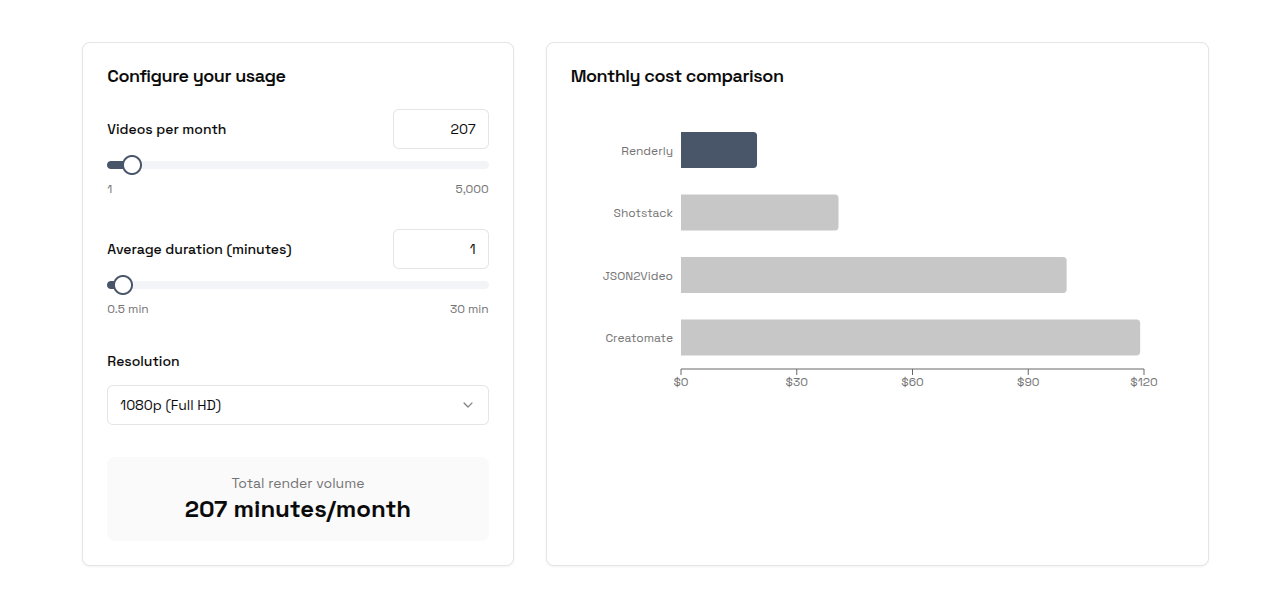
Cost per Minute at 1080p
Every platform prices differently: credits, subscriptions, per-minute, per-second, resolution multipliers. Here's the actual cost per minute of 1080p video across the headline tiers.
| Platform | Plan | Cost per Minute (1080p) | vs. Renderly Sub |
|---|---|---|---|
| Renderly | Business ($99/mo) | $0.10 | - |
| Renderly | PAYG | $0.20 | - |
| Shotstack | PAYG | $0.30 | 3x more |
| Shotstack | Subscription ($39/mo) | $0.20 | 2x more |
| Creatomate | Essential ($54/mo) | $0.84 | 8.4x more |
| Creatomate | Growth ($129/mo) | $0.40 | 4x more |
| Creatomate | Beyond ($329/mo) | $0.21 | 2.1x more |
| JSON2Video | Prepaid Pack | $0.38-0.42 | 3.8-4.2x more |
| JSON2Video | Professional ($49.95/mo) | $0.25 | 2.5x more |
| JSON2Video | Startup ($99.95/mo) | $0.20 | 2x more |
[ORIGINAL DATA] These effective per-minute rates come from dividing each plan's cost by its included minutes, after converting every credit system to actual rendered minutes at 1080p. Even Renderly's no-commitment PAYG rate ($0.20/min) matches or beats most competitors. On the $99/month Business plan the effective rate is $0.10/min, making every competitor at least 2x more expensive, and up to 8.4x more on their entry plans.
Pricing Scenario: 1,000 One-Minute Videos per Month (1080p)
Let's get specific. Here's what each platform actually costs to render 1,000 videos at 1 minute each, in 1080p:
| Platform | Plan Needed | Monthly Cost | Cost per Video | Notes |
|---|---|---|---|---|
| Renderly | Business ($99/mo) | $99 | $0.10 | 1,000 credits included |
| Shotstack | $39/mo + overage | ~$200 | ~$0.20 | 200 min included, 800 min overage at sub rate |
| Creatomate | Beyond ($329/mo) | ~$329 | ~$0.33 | 1,607 min capacity, fits but pricey entry |
| JSON2Video | Custom Enterprise | ~$200+ | ~$0.20 | Startup ($99.95) covers only 500 min; 1,000 needs a custom plan |
At 100 videos/month (1 minute each, 1080p):
| Platform | Plan Needed | Monthly Cost | Cost per Video |
|---|---|---|---|
| Renderly | Creator ($29/mo) | $29 | $0.29 |
| Renderly | PAYG (no commitment) | $20 | $0.20 |
| Shotstack | $39/mo subscription | $39 | $0.39 |
| Creatomate | Growth ($129/mo) | $129 | $1.29 |
| JSON2Video | Professional ($49.95/mo) | $49.95 | $0.50 |
At 100 videos/month, you'd pay $20-29 with Renderly vs. $39-129 with every competitor - Creatomate's Essential plan holds only ~64 minutes of 1080p, so 100 one-minute videos already require Growth. At 1,000 videos/month, Renderly's subscription saves you $100-200/month compared to the best alternative. For a deeper, five-provider cost model across multiple production scenarios, see our dedicated video API pricing comparison.
Feature Matrix
| Feature | Renderly | Shotstack | Creatomate | JSON2Video |
|---|---|---|---|---|
| Visual Editor | Yes | Basic + SDK | Advanced | Basic |
| Template Variables | Yes | Yes | Yes | Limited |
| Keyframe Animations | No | No | Yes | No |
| Webhook Support | Yes | Yes | Yes | Yes |
| Batch Processing | Yes | Yes | Yes | Limited |
| Auto-Scaling | Yes | Yes | Yes | Limited |
| Official SDKs | REST | Node, Python, PHP, Ruby | REST | Node, PHP |
| No-Code Integrations | - | Zapier, Make | Zapier, Make, n8n | Make |
| MCP Server | - | Yes | - | - |
| Free Tier | Yes | 10 min (30 days) | 50 credits (one-time) | 10 min (watermarked) |
| Max Resolution | 1080p & 4K (all plans) | 1080p (4K High Volume) | Resolution-dependent | 1080p (4K at 4x cost) |
| AI Features | - | Image, audio gen | - | Voiceover, image gen |
Rendering Speed
For developers building real-time or near-real-time workflows, render latency matters as much as price. Shotstack leads here by a wide margin, finishing a one-minute 1080p render in about 20 seconds while the others take two to six times longer.
| Platform | ~Time per 1-min video | Notes |
|---|---|---|
| Shotstack | ~20 seconds | Fastest managed API, parallel rendering |
| Renderly | ~30-60 seconds | Depends on complexity |
| Creatomate | ~45-90 seconds | Depends on effects and resolution |
| JSON2Video | ~60-120 seconds | Slower under load |
[PERSONAL EXPERIENCE] When I benchmarked these myself, the speed gap was the most consistent finding across runs. Shotstack's parallel rendering held steady even on heavier timelines, while JSON2Video's render times drifted upward as I queued more jobs at once. If your use case is interactive (a user clicks "generate" and waits), that difference is the whole experience.
Which Video API Should You Choose?
There's no single "best" video API, and the right pick depends on volume, budget, and team skills. That choice matters more every year: 84% of developers now use or plan to use AI tools in their workflows, up from 76% in 2024, according to the most recent Stack Overflow Developer Survey (Stack Overflow, 2025). Video generation is increasingly part of that automated stack. Here's how I'd decide.
Choose Renderly if:
- You need to generate videos at scale and cost is a primary concern
- You want flexibility, PAYG with no commitment, or a subscription starting at $29/mo
- Your templates use variable replacement (names, images, text)
- You need 1080p and 4K exports without paying enterprise pricing
Choose Shotstack if:
- Rendering speed is critical for your workflow
- You need official SDKs in Python, Ruby, or PHP
- You're building a product with embedded video editing (white-label SDK)
- You need ProRes or alpha transparency support
Choose Creatomate if:
- Template design quality is your top priority
- You need keyframes, 3D effects, or complex text animations
- Designers and developers collaborate on templates
- You have consistent high volume to justify the Beyond tier
Choose JSON2Video if:
- You need simple video automation at low volume
- Your team uses Make.com or no-code tools
- You prefer a cheap Hobby tier or a one-time prepaid purchase over a heavy subscription
- Your use case is straightforward scene-based content
The Bottom Line
The right choice depends on your volume, budget, technical requirements, and team skills. That decision pays off either way: 82% of marketers say video delivers a strong return on investment (Wyzowl, 2026), so the cost difference between providers flows straight to your margin. If you want to compare exact costs for your specific use case, try our Video API Cost Calculator, it takes 10 seconds. If your primary use case is personalization, our personalized video at scale guide covers the production approaches and where each API fits.
But if I had to give a general recommendation: look at your expected monthly volume first. That single number will narrow your choice quickly.
At any volume, Renderly is the most affordable option: $0.20/min with no commitment, or $0.10/min on the $99/month Business plan. That's 2-8x cheaper than every competitor at 1080p. At high volume with design complexity, Creatomate's Beyond tier narrows the gap. For speed-critical workflows, Shotstack is unmatched. And for simple, low-volume automation, JSON2Video's new Hobby tier or a prepaid pack gets the job done without a heavy subscription. If you're weighing an API against hiring a production crew, our video API vs traditional production cost comparison runs that math in detail.
The good news? Every platform on this list offers a free tier or trial. Spin up a test project on two or three of them, render the same video, and see which one clicks for your workflow.
Ready to try Renderly?
Start generating videos in minutes, grab a PAYG credit pack with no commitment, or subscribe for $29/month and get 200 minutes included at a lower rate. Just send us a JSON config, and we'll render a video for you.
Frequently asked
What is the best video API for developers in 2026?
How much does a video rendering API cost per minute?
Which video API renders fastest?
Do video APIs charge extra for 4K rendering?
Are there free video APIs for testing?
Related Articles
Video APIs in 2026: The Developer's Complete Guide
What a video API costs, how the three architectures differ, and how to ship your first render. One 1080p minute runs $0.10-$0.84 across four verified rate cards.
August 12, 2026
Video API Pricing Comparison 2026: The Real Cost Per Video
Five video APIs, every rate card re-checked in August 2026. One finished 1080p minute costs $0.10 to $1.38 depending on who you buy it from - and the credit math hides most of it.
August 14, 2026

Video API vs Traditional Video Production: 2026 Cost Comparison
Agency video runs $1,000–7,000 per finished minute (Synthesia, 2025). Template APIs render the same minute for $0.10–0.20. The real cost math, tier by tier.
August 5, 2026
How to Generate 1,000+ Personalized Videos with API Automation (2026 Update)
A 30-second 1080p render costs $0.10 on a template API and $1.50+ on a generative one. Build the bulk pipeline: 1,000 personalized videos queued in under 20 minutes.
May 18, 2026