
Automate TikTok Videos: Render the Recurring Post on a Schedule
Automate the TikTok post you repeat, not the idea. Pull this week's data from the system that already holds it, render one vertical video on a cron, then post it.
The TikTok post worth automating is the one you repeat: same format, new data, every week. Point a scheduled job at the system that already holds that data, send one render request per account, and the week's posts arrive in about a minute. Each 31-second video costs one credit.
The finished video
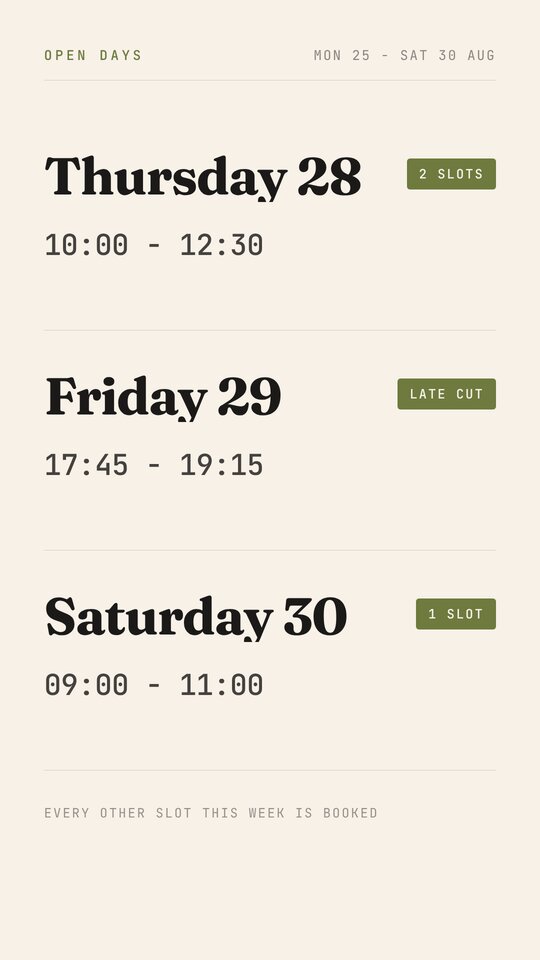
This guide renders Stylist Availability & Booking - a 31-second 9:16 card for one practitioner rather than one business. Five scenes carry it: a full-bleed portrait, a 440px numeral for the slots still open, a three-row day table held for nearly ten seconds, a booking plate, and a sign-off with the handle and the link.
Nineteen fields drive 67 overlays.
What you need
- A Renderly API key. Create one in the dashboard under Settings → API keys.
- Read access to wherever the week already lives: a booking tool, a rota sheet, your own database.
- A scheduler. A cron entry, a GitHub Action on a
scheduletrigger or Vercel Cron all work; the job runs once a week and exits.
Step 1 - Decide which TikTok post actually repeats
Automation cannot invent the idea. It can only run a post you already make, so the first job is to find the one whose format is fixed and whose data moves.
Three shapes of account qualify, and they want different machinery:
- A written batch - facts, stories, tips, authored in one sitting and drip-fed. See the faceless Shorts guide.
- A log of finished work - the client, the result, the photograph. See the Reels guide.
- A recurring data post - this week's slots, this week's classes, today's price: a query against a system you already run.
The third is the one to wire first, because its content expires. A barber's open slots are wrong by Tuesday, so the post gets remade every week whether or not anyone automates it. That is a schedule, not a content calendar, and software is good at schedules.
Step 2 - Point the job at the system that already holds the week
Do not build a spreadsheet for this. The week already exists in the tool that takes the bookings, and the template's fields are shaped like a row out of it:
| Template field | Source |
|---|---|
open_count | count of unbooked slots this week |
day_1_name / day_1_time / day_1_note | the first open slot, formatted |
stylist_name, stylist_role, stylist_photo | the staff record |
week_label | the date range, one value for everybody |
booking_link, booking_note, handle | fixed per practitioner |
week_label is one field spent in six overlays - under the portrait, on each of
the three middle scenes at y=80, and in the closing footer band. Write it once
per run.
Step 3 - Fill the three day rows and nothing else
The timetable is a strict shape. Three rows, three fields each, on a 440px
pitch. day_1_name is 104px Fraunces in a 700px box, day_1_time is 58px mono
under it, and day_1_note is a 26px chip in a 250px box to the right.
There is no fourth row, and adding one is a template change rather than a replacement. So the query has to choose: sort by whatever converts and take three.
Step 4 - Keep the frame the viewer reads out of TikTok's chrome
TikTok stacks the caption, the handle and the sound ticker over the bottom of the frame, and runs its action rail down the right side. The template's own coordinates tell you what survives that:
- The day table runs from y=282 to y=1419 of a 1,920px frame, and it holds for nearly ten seconds. This is the frame people screenshot, and it is clear.
salon_lineat y=1509 and the closingweek_labelat y=1835 sit inside the caption block. Treat them as a signature rather than as information.- The
day_N_notechips sit at x=742 to x=992, which is the column TikTok fills with like, comment and share. The times in the left column carry the message; read the chips as decoration.
Then the wrapping, fixed-box and unforgiving:
{
  "personal_note": "Two morning cuts and one late\nSaturday. After that I'm full\nuntil September.",
  "booking_note": "£10 deposit holds your slot -\nit comes off the bill."
}personal_note is 52px in a 992x300 box, which is four lines. booking_note is
46px in a 992x190 box, which is three. Put a real newline where you want the
break: a value that finds its own loses whatever falls out of the box, and the
render still reports success.
Step 5 - Render on a schedule, one request per account
One practitioner becomes one POST:
curl -X POST https://renderly.video/api/v1/renders \
  -H "Authorization: Bearer $RENDERLY_API_KEY" \
  -H "Content-Type: application/json" \
  -d '{
    "templateId": "stylist-availability-booking",
    "replacements": {
      "stylist_photo": "https://cdn.example.com/staff/danny.jpg",
      "stylist_name": "Danny Reyes",
      "stylist_role": "Barber - fades, beards, hot towel",
      "salon_line": "Chair 3 - Fold Barbers - Peckham",
      "week_label": "Mon 25 - Sat 30 Aug",
      "open_count": "4",
      "personal_note": "Two morning cuts and one late\nSaturday. After that I am full\nuntil September.",
      "day_1_name": "Thursday 28",
      "day_1_time": "10:00 - 12:30",
      "day_1_note": "2 slots",
      "day_2_name": "Friday 29",
      "day_2_time": "17:45 - 19:15",
      "day_2_note": "Late cut",
      "day_3_name": "Saturday 30",
      "day_3_time": "09:00 - 11:00",
      "day_3_note": "1 slot",
      "booking_link": "book.foldbarbers.co/danny",
      "booking_note": "£10 deposit holds your slot -\nit comes off the bill.",
      "handle": "@dannycuts"
    },
    "webhookUrl": "https://your-app.com/hooks/renderly"
}'The job that sends it is small, because the schedule does the work:
// Sunday 20:00, one run a week.
const week = await bookingTool.openSlotsThisWeek();
const label = "Mon 25 - Sat 30 Aug";

for (const person of week.filter((p) => p.openCount > 0)) {
  await fetch("https://renderly.video/api/v1/renders", {
    method: "POST",
    headers: {
      Authorization: `Bearer ${process.env.RENDERLY_API_KEY}`,
      "Content-Type": "application/json",
    },
    body: JSON.stringify({
      templateId: "stylist-availability-booking",
      replacements: { ...toReplacements(person), week_label: label },
      webhookUrl: "https://your-app.com/hooks/renderly",
    }),
  });
}The request returns a job ID immediately, because rendering is asynchronous. The
filter is the load-bearing line: skipping a person with nothing open is
cheaper than checking the output afterwards.
Step 6 - Take the finished video off the webhook and post it
Because webhookUrl was included, Renderly posts back per job:
{
  "event": "render.completed",
  "data": {
    "jobId": "cm9x2k4p10001qw8r7a3b2c1d",
    "status": "COMPLETED",
    "outputUrl": "https://cdn.renderly.video/renders/cm9x2k4p10001qw8r7a3b2c1d.mp4",
    "creditsUsed": 1,
    "durationInFrames": 930,
    "width": 1080,
    "height": 1920,
    "fps": 30
  },
  "timestamp": "2026-08-24T20:01:12.480Z"
}Write outputUrl against the practitioner and let the publisher take it from
there. Payloads are signed with HMAC-SHA256, so verify the signature before you
trust the body; the
webhooks guide covers the check.
What this costs at scale
Renderly bills 1 credit per minute of 1080p output, rounded up to the nearest half credit. This card runs 31 seconds, which rounds to a full credit - the first template in this cluster to cross that line.
| Renders per month | Credits | Plan |
|---|---|---|
| 4 - one person, one post a week | 4 | Creator, $29/mo |
| 35 - eight chairs, weekly | 35 | Creator, $29/mo |
| 175 - forty chairs across three sites | 175 | Creator, $29/mo |
| 260 - sixty chairs across five sites | 260 | Business, $99/mo |
| 1,000 | 1,000 | Business, $99/mo |
The third row is the one to sit with. Forty practitioners posting their own availability weekly is 87% of the cheapest paid plan, about fifteen cents a video. Nobody approves a weekly design job for forty people.
Where to go next
The schedule needs a source. If the week lives in a spreadsheet, the Google Sheets guide has the loop as an Apps Script; if the account posts finished work instead of upcoming availability, the Reels guide runs the same machinery on a different unit.
If the TikToks are paid rather than organic, the job is a variant matrix instead of a schedule: batch-rendering ad variants measures that one.
Frequently asked
Does Renderly post to TikTok for me?
What if only two days are open that week, or five?
Why does a 31-second video cost a whole credit?
What happens if the source is empty when the job runs?
Can one job cover several people on one account?
Related guides
Automate Instagram Reels: One Template, One Row per Post
Run a Reels account off a spreadsheet. Lock one format, keep a row per post, and render the week in a single pass for half a credit a video.
Faceless YouTube Shorts Automation: Render a Month of Uploads
Run a faceless Shorts channel from a spreadsheet. Lock one format, write a batch of facts, add an AI voiceover, and render a month of uploads in one pass.