
Social Media Video Automation: Batch-Render Ad Variants
TikTok suggests 3-5 creatives per ad group across 3-5 ad groups, so up to 25 videos. We rendered variants of one 9:16 template in 13 to 19 seconds each.

Founder
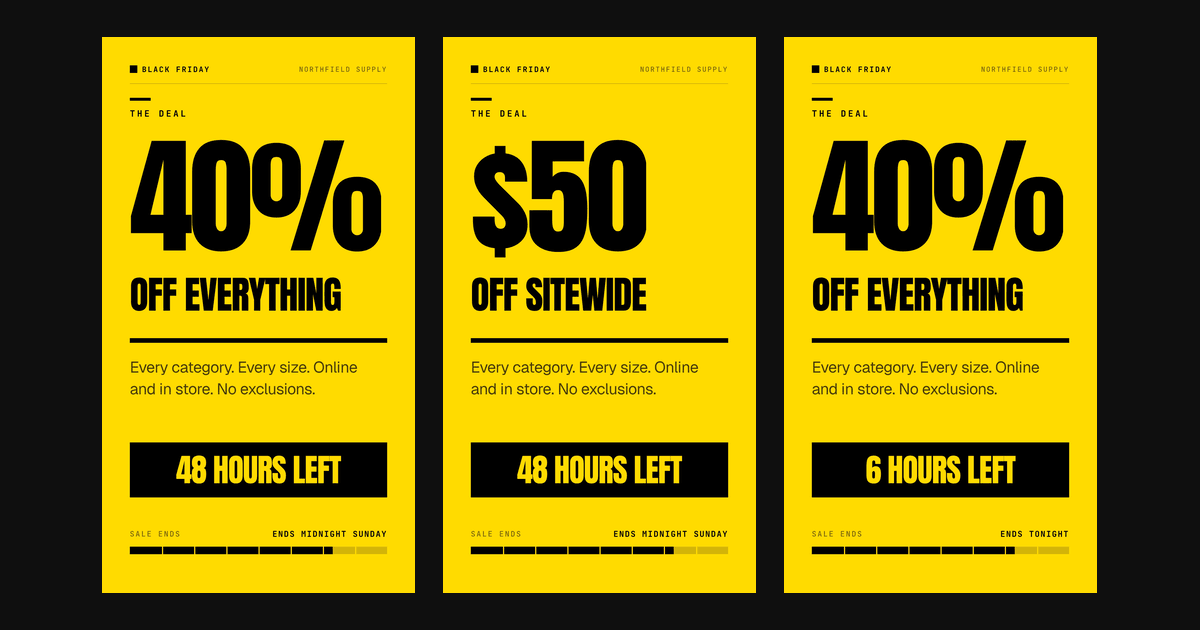
Your media buyer wants more creative. TikTok's own guidance says a single campaign should carry 3 to 5 creatives per ad group across 3 to 5 ad groups, which is up to 25 videos. For one campaign. This month.
Nobody hand-edits 25 vertical videos for one offer. So the usual answer is an AI video generator, and that answer quietly breaks the thing you were trying to do.
Here's what social media video automation looks like when the goal is a creative test: one template, a variable matrix, and a batch render. I built it against a live 9:16 flash-sale template, rendered four real variants, timed them, and hit a failure that has nothing to do with rendering. All the numbers below are measured, and the prop files are reproducible.
Key Takeaways
- TikTok suggests "3-5 different creatives per ad group and 3-5 diversified ad groups per campaign" (TikTok Ads), so 9 to 25 videos for one campaign.
- Four variants of the same 20-second 9:16 template rendered in 13 to 19 seconds each. The renders finish faster than the videos play.
- Motion's 2026 benchmarks: top-quartile Meta advertisers launch 1.7x to 2.9x the weekly creative of the average account in their spend tier.
- 25 variants costs 12.5 credits, about $1.81 on the Creator plan or $1.24 on Business. The batch is not the expensive part.
- The real failure mode is copy length, not rendering. A longer replacement value clipped inside a fixed-size text box and the render still reported success.
What social media video automation actually means
Two very different jobs share this name, and picking the wrong one wastes a week. Automation here means assembling a fixed layout from swapped values, not generating new footage. The layout, timing, and animation stay identical across every output. Only the values you nominate change.
That distinction decides which job you're doing. One job is many variants of one offer, for creative testing on paid social. That's this post. The other job is one video per item in a catalog, which is a different shape of problem covered in our guide to e-commerce product video automation. Same machinery, different unit of work.
The example throughout is a real template: Black Friday / Flash Sale Countdown, a five-scene 1080x1920 composition running 20 seconds at 30fps. It carries 92 overlays. Twenty-nine of them are marked replaceable, driven by 12 named variables.
How many ad variants do you actually need?
TikTok publishes the number. Its creative best practices for performance ads state: "We suggest between 3-5 different creatives per ad group and 3-5 diversified ad groups per campaign" (TikTok Ads Help Center, retrieved 2026-08-20). Multiply the low end and you get 9 videos. Multiply the high end and you get 25.
Meta says something similar on the other platform, and it's worth quoting with its scope intact. In its best practices for Advantage+ app campaigns, Meta writes: "You can add up to 50 images or videos at one time. In order to maintain the best performance for your ads, we recommend that you upload a high volume of creative assets and refresh them a few times a month to avoid creative fatigue" (Meta Business Help Center, retrieved 2026-08-20). That guidance is written for app campaigns, not as a blanket rule, but the instruction is the same one TikTok gives.
Both platforms tell you to ship volume and refresh it. Neither tells you how to produce it. TikTok also has a preference about how you refresh: "add new creatives to an existing ad group instead of creating a new ad group to extend its lifetime." So the volume isn't a one-time build. It's a standing supply problem.
How much creative do the top advertisers ship each week?
Motion's 2026 Creative Benchmarks Report puts a number on it. Across 578,750 Meta ad creatives from 6,015 advertiser accounts, the top quartile of accounts in every spend tier launched between 1.7x and 2.9x as many new creatives per week as the average account (Motion, data from September 2025 to January 2026). A top-quartile Enterprise account ships about 55 a week.
Read the top-quartile column with care. Motion defines it as the top 25% of accounts by winner count within each spend tier, and it defines a winner as an ad that spends at least 10x its account's median and at least $500 in total (Motion methodology). That measures spend, not return on ad spend. It also shows an association, not a cause: the report doesn't show that shipping more creative produced the winners. Motion sells creative analytics, so treat this as vendor research.
Even so, the arithmetic behind volume is plain. Roughly 5% of creatives are winners (Motion), so 20 uploads yield about one winner and 50 yield two or three. Nobody can predict which ones, which is why the count matters.
Here is where a template batch sits on that scale. One batch of 25 variants a month is 5.8 a week. That is above the all-accounts figure for a Small brand ($10K-$50K a month, 4.10) and below its top quartile (8.09). Two batches a month is 11.5 a week, which clears the Small top quartile and matches the Large all-accounts figure (11.24). Motion counts unique creatives, and I could not find how it treats near-identical variants, so read this as a rough scale and not a like-for-like match.
Timing matters this quarter. Black Friday 2026 falls on Nov 27 and Cyber Monday on Nov 30, which puts Black Friday 28 days before Christmas, against 31 days in 2023. Motion's data window includes the 2025 Black Friday and Cyber Monday period but publishes no separate holiday cut, so these are September-to-January averages, not Q4 peaks. The practical plan is to run the variant matrix in October, keep the winners, and treat November as a re-render of the best variants with new deadline copy.
Why AI generation breaks a creative test
A creative test only works if every variant is identical except the one thing you're testing. Change the offer and the footage and the pacing at once, and a winning variant tells you nothing you can act on. You've learned that one specific video worked, not why.
This is where generation and testing pull against each other. Ask a generator for 25 videos and you get 25 videos that differ in every dimension. The result isn't a test, it's a lottery with a bigger ticket count. You can still find a winner, but you can't extract a rule from it, so next month you start over.
Template assembly inverts that. The 63 static overlays in our example can't drift, because nothing in the pipeline touches them. The 29 replaceable fields change only where you name them. Isolation isn't a discipline you have to maintain, it's a property of the file. That's the whole argument for template-based video over AI-generated video when the goal is a readable test rather than a pile of assets.
Step 1: Pick the variable you're testing
The template's variable contract is the test plan. Twelve named keys, each mapping to one testable idea:
| Key | Default | Overlays it updates | What it tests |
|---|---|---|---|
sale_name | BLACK FRIDAY | 6 | Brand frame |
store_name | Northfield Supply | 6 | Brand frame |
deadline_label | ENDS MIDNIGHT SUNDAY | 6 | Urgency |
discount_value | 40% | 2 | Offer |
time_remaining | 48 HOURS LEFT | 2 | Urgency |
discount_scope | OFF EVERYTHING | 1 | Offer |
urgency_line | When it's gone, it's gone. | 1 | Urgency |
product_image | hero image URL | 1 | Creative |
promo_code | FLASH40 | 1 | Attribution |
cta_label | SHOP NOW | 1 | Call to action |
cta_detail | northfieldsupply.com/bf | 1 | Call to action |
terms_note | Discount applied at checkout | 1 | Compliance |
Look at the third column. Three of those 12 keys each write to six different overlays, spread across all five scenes. Change deadline_label once and every scene updates together.
That fan-out is why a declared variable contract beats find-and-replace on a script. With find-and-replace, six occurrences are six chances to leave one stale, and a stale deadline in scene four is the kind of thing nobody catches until a customer does.
For a test matrix, combine axes rather than listing videos. Two offers, times two urgency framings, times two calls to action, is 8 variants. Add three hero images and you're at 24, right inside TikTok's recommended band.
Step 2: Build the matrix and send it
The render request takes ten fields, and replacements is the one that matters here. You pass templateId plus a replacements object keyed by variable name, and every replaceable overlay carrying that name picks up the new value.
const OFFERS = [
  { discount_value: "40%", discount_scope: "OFF EVERYTHING", promo_code: "BF40" },
  { discount_value: "$50", discount_scope: "OFF SITEWIDE",   promo_code: "BF50" },
];
const URGENCY = [
  { deadline_label: "ENDS MIDNIGHT SUNDAY", time_remaining: "48 HOURS LEFT" },
  { deadline_label: "ENDS TONIGHT",         time_remaining: "6 HOURS LEFT" },
];
const CTAS = [{ cta_label: "SHOP NOW" }, { cta_label: "SHOP THE SALE" }];

for (const offer of OFFERS) {
  for (const urgency of URGENCY) {
    for (const cta of CTAS) {
      await fetch("https://renderly.video/api/v1/renders", {
        method: "POST",
        headers: {
          Authorization: `Bearer ${process.env.RENDERLY_API_KEY}`,
          "Content-Type": "application/json",
        },
        body: JSON.stringify({
          templateId: "black-friday-flash-sale-countdown",
          replacements: { ...offer, ...urgency, ...cta },
        }),
      });
    }
  }
}Eight variants, one nested loop. The API also accepts replacement keys at the top level. So { templateId, discount_value: "40%" } does the same thing as nesting them, which helps when you're mapping a spreadsheet column onto a request.
Register a webhook endpoint once with POST /api/v1/webhooks and let completions come to you. Skip the per-render webhookUrl for batch work. It's signed with a constant rather than your secret, carries no delivery id, and isn't retried. It can't support the idempotency a 25-render batch needs. The full setup is in our guide to video rendering webhooks.
Prefer not to write the loop? The Zapier integration can start a render from a spreadsheet row using a project or a system template. Make.com can do the same through its HTTP module, calling this endpoint with a templateId (setup guide). The Make Renderly module itself works from projects only. A variant matrix is genuinely easier as a loop, though. Nested combinations are what code is good at.
Step 3: Know what the batch costs
A 20-second 1080x1920 render costs 0.5 credits. Twenty-five of them is 12.5 credits, which is about $1.81 on the $29 Creator plan (200 credits, so $0.145 each) and about $1.24 on the $99 Business plan (1,000 credits). Rendering is not the expensive part of creative testing. It stopped being the expensive part a while ago.
One honest wrinkle in our own favor and against it: credits round up to the nearest half. A 20-second video is 0.33 minutes of output, but it bills as 0.5. Short vertical assets therefore pay a premium against our headline per-minute rate, which narrows the gap to vendors that meter by the second.
On entry plans, Shotstack is the cheapest option for this batch at $1.67, and Renderly's Creator plan comes second at $1.81. Creatomate and Plainly cost roughly 5x and 6x as much as Creator for the same 25 videos. Creatomate's total depends on frame rate, because it prices a credit at 100 million output pixels: at the template's 30 fps the batch is 311 credits, and at 25 fps it would be 259 credits, or $7.00.
Now price it as a habit instead of a one-off, because that's how both platforms describe it. TikTok says to refresh "when delivery results exhibit a consistently declining trend," and Meta's app-campaign guidance says a few times a month. Call it two batches of 25 monthly: 25 credits, roughly $3.63 on the Creator plan, which includes 200 credits a month. The credits stop being the constraint almost immediately.
What replaces them as the constraint is copy. Fifty variants a month means fifty sets of values that all have to be written, checked, and kept truthful about the actual offer. That's the work the render pipeline hands back to you, and it's worth staffing for before you automate the easy half.
Full per-minute rates and break-evens are in our video API pricing comparison. One more thing matters at batch scale: a failed render refunds its credits automatically, exactly once, and a job whose worker dies gets swept and refunded within two hours. In a 25-render batch, one bad image URL should cost you a retry, not a support ticket.
Does one render cover TikTok, Reels, and Shorts?
Yes, and that's the easy part. All three placements take a 1080x1920 vertical video, so a single render ships to all three with no extra work and no extra credits. The 20-second runtime sits inside every one of their limits too.
Feed placements are where it stops being easy, and the API has a trap here worth knowing about. The render request accepts width and height overrides, which looks like a free way to get a 4:5 or 1:1 cut out of the same template. It isn't. Those fields resize the canvas; they don't re-lay-out the composition.
I tested it rather than assuming. Rendering the same variant with height: 1350 produced this:
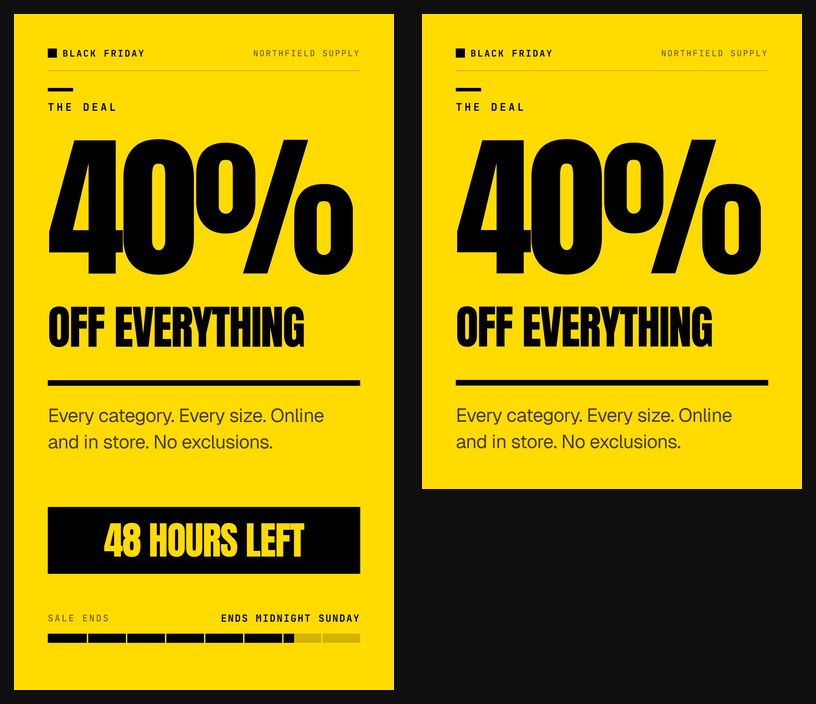
Everything above the cut is identical. Everything below 1350 pixels is gone, including the urgency bar and the countdown footer, which happened to be the two elements carrying the deadline. The render succeeded and reported no problem.
So treat aspect ratio as a template property, not a request parameter. If you need a 4:5 feed cut, use a composition authored at 4:5 and give it the same variable names. Then one matrix of replacement values drives both, and you're back to changing one thing at a time.
What actually breaks: copy length, not the render
Here's the part the tool blogs skip. I rendered four variants of this template and all four succeeded. One of them was unusable anyway.
Our finding: every one of the 44 text overlays in this template sets
fontSizeFixed: true. Nothing auto-shrinks. A replacement value longer than the default wraps to a second line, and if the box has no room for one, that line gets clipped. The render still reports success.
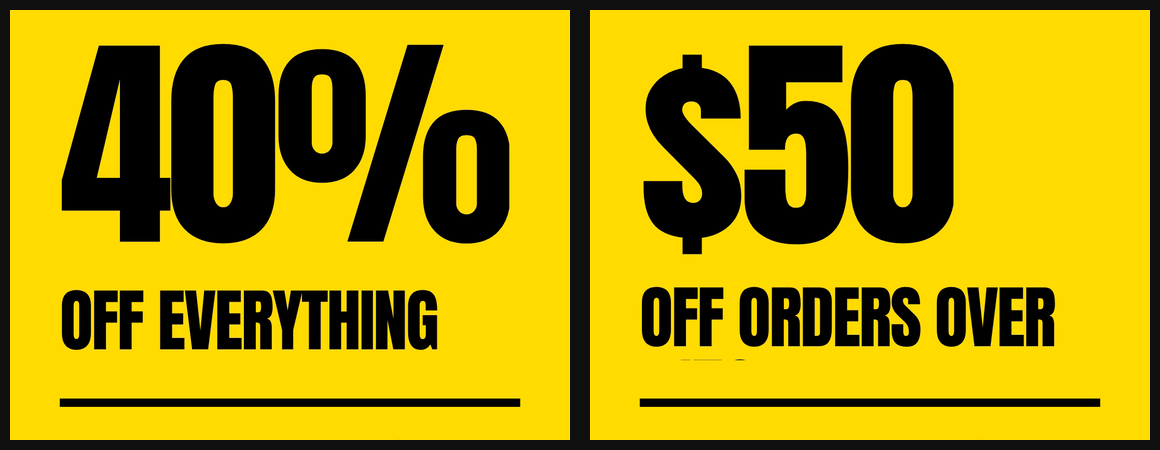
The numbers behind that image: discount_scope sits in a 980 by 152 pixel box, set in Anton at 132px with a line height of 1.06. One line needs about 140 pixels, so the box fits exactly one. "OFF EVERYTHING" is 14 characters and fits. "OFF ORDERS OVER $150" is 20 characters, needs about 259 pixels, and loses its bottom half.
So write the pre-flight check into the workflow. Auditing the props before rendering caught it:
[32] discount_scope       "OFF ORDERS OVER $150"
  likely WRAPS: ~2 rendered lines vs 1 authored
  likely CLIPS vertically: needs ~259px height, container 152px
Shortening the value to "OFF SITEWIDE" cleared the warning, and the re-render is the middle panel of this post's cover image. But treat the audit as a screen, not a verdict. It also flagged a "SHOP THE SALE" button that rendered perfectly well on one line, because its width estimate assumes an average character and Anton is condensed. So: audit to find candidates, then render a single frame of each candidate to confirm. Two cheap steps beat 25 expensive ones.
The practical version of this is a character budget per axis. Before you write 25 variants of copy, find out how many characters each slot actually holds, and write to it.
How do you tell which variant won?
The render request has no metadata field. It takes ten fields, none of which is a label, so there's nowhere to stash "variant B, urgency test" on the job itself. Don't add a metadata key of your own. The API reads any unknown key as a replacement variable, so it would be treated as a variable named metadata that matches no overlay. Attribution has to live somewhere else.
The move that works for offer testing is a unique code per variant. Our four renders carried BF40, BF50, and BFTONIGHT, each visible on the closing frame:

A code redeemed at checkout attributes cleanly, independent of pixels, attribution windows, and platform reporting disagreements. Pair it with your own file naming and the platform's UTM parameters and you can reconcile three ways.
It has a real limit, and it's worth saying plainly. This works for coded offers. It does nothing for brand or awareness variants, where there's no redemption event to tie back. For those, per-variant landing pages are the closest equivalent.
Where this fits
Two platforms are telling advertisers to ship more video than a human can edit, and neither is going to stop. The money is moving the same way: the IAB projects US digital video ad spend will pass $80 billion in 2026, up 11% year over year (IAB, May 2026). The production method matters more than the volume target. A batch of 25 unrelated videos costs the same as a batch of 25 controlled ones, and teaches you far less.
- TikTok's own number is 9 to 25 creatives per campaign, refreshed into existing ad groups.
- Motion's data shows top-quartile Meta advertisers ship 1.7x to 2.9x the weekly creative of the average account, and two batches of 25 a month is about 11.5 a week.
- One template with a named variable contract holds everything constant except the axis you're testing.
- The batch is cheap: 12.5 credits, about $1.81 on Creator, and roughly 6 minutes of render time for 25 variants.
- Budget characters per slot before you write the copy, and confirm one frame per axis before you render the batch.
Scaling past a few dozen renders is the same pattern with better plumbing. That's covered in generating 1,000+ videos with API automation. The wider strategy sits in our guide to personalized video at scale.
Start with the template this post used. The Black Friday / Flash Sale Countdown page has a working preview and the same 12 variables, so your first variant matrix is a loop away.
Frequently asked
How many video ad variants do you need for TikTok?
How many new ad creatives do top Meta advertisers launch each week?
How long does it take to render 25 video ad variants?
What does a batch of 25 video ad variants cost?
Can you batch-render vertical video without writing code?
Why not use an AI video generator for ad variants?
Related Articles
Personalized Video at Scale: The Complete Guide (2026)
83% of consumers can spot AI video and 36% trust those brands less. Here's how to scale personalized video in 2026 without falling into the avatar trap.
June 4, 2026
E-commerce Product Video Automation: Catalog to Video at Scale
85% of shoppers say a video convinced them to buy. Here's how an ecommerce product video API turns a Shopify catalog into a video ad for every SKU.
June 20, 2026
Dynamic Video Templates: Variable-Based Video Creation
91% of businesses use video and 82% report good ROI (Wyzowl 2026). Dynamic video templates let you build one design and render thousands of unique videos.
July 16, 2026
Template-Based Video vs AI-Generated Video: Which Should You Choose?
Template video vs AI video in 2026: a 1080p minute costs $0.10-$0.20 to render from a template and $4.80-$24.00 to generate with Veo 3.1. Here's the decision rule.
April 16, 2026