
How to Automate Real Estate Listing Videos with an API
474,976 new US listings hit the market in May 2026 - almost none got a video. Here's how to turn listing data into property videos with one API call.

Founder
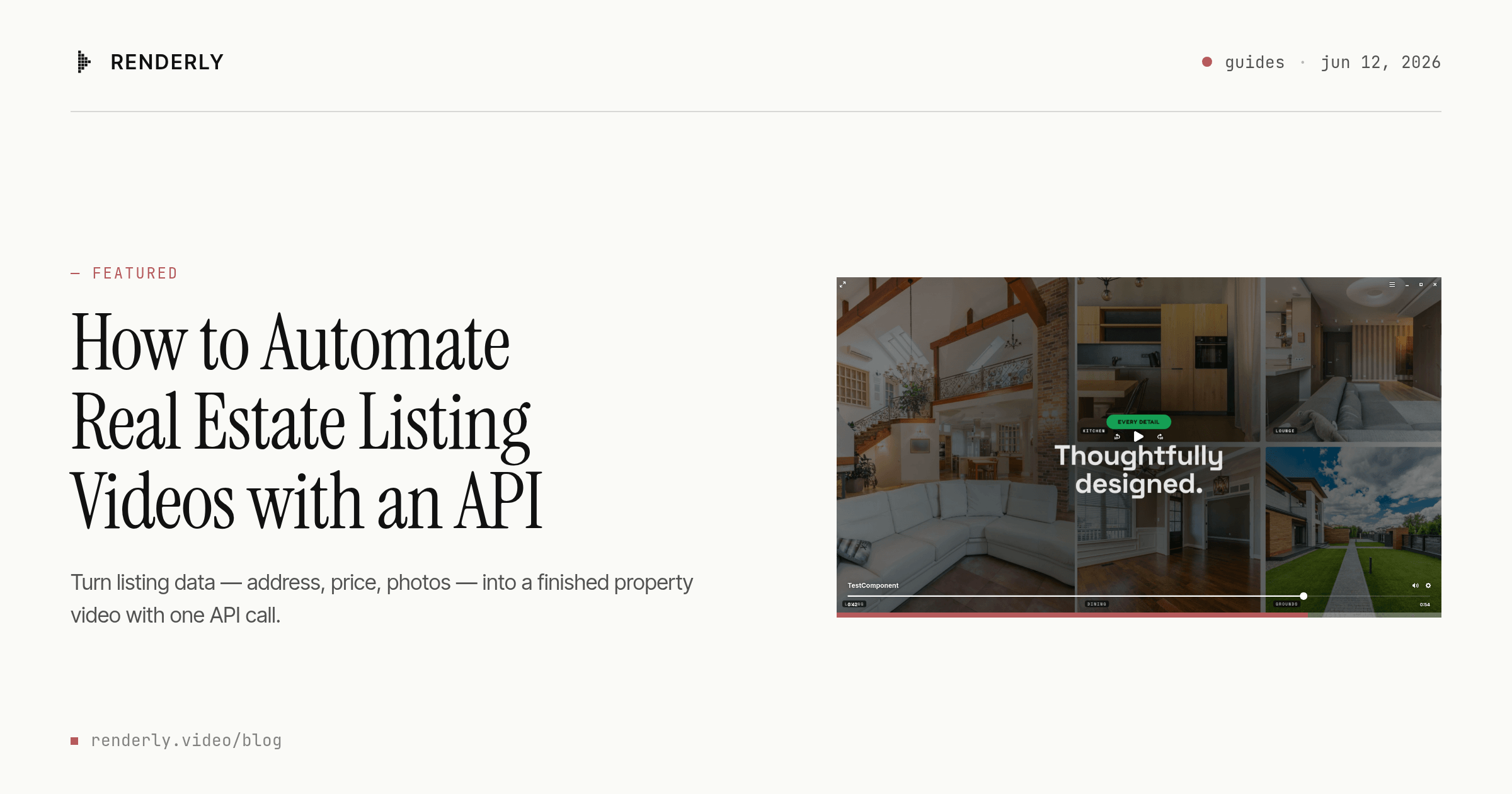
In May 2026, 474,976 new listings hit the US market - the strongest May in four years (Realtor.com, June 2026). Almost none of them got a video. Not because agents don't want one: buyers' agents rate video as highly important to their clients on nearly half of listings. The blocker is production - a videographer costs hundreds of dollars per property and books out days or weeks in peak season.
This guide shows you how to close that gap with a video API. By the end, you'll render a cinematic 54-second listing tour - Ken Burns photo scenes, walkthrough clip, animated price reveal, agent contact card - from a single JSON payload. We'll cover the API path, the MLS data mapping nobody else documents, and the no-code route for non-developers.
Key Takeaways
- In May 2026, 474,976 new US listings hit the market (Realtor.com) - more volume than any brokerage can cover with shoots
- NAR's 2025 data: buyers' agents rate video highly important on 48% of listings, and social media is Realtors' #1 lead source at 39%
- A template-based API renders a finished 54-second listing video for about $0.18, versus $200-$2,500 for traditional videography
- The famous "403% more inquiries" stat is a 2012 Australian portal metric - NAR never published it
Why Automate Real Estate Listing Videos?
In 2025, NAR's Profile of Home Staging found that buyers' agents rate listing photos (73%), home staging (57%), listing videos (48%), and virtual tours (43%) as highly important to their buyers (NAR, 2025). Video sits in the top tier of listing marketing - yet it's the asset most listings skip, because it's the most expensive one to produce per property.
The demand side keeps tightening. In NAR's 2025 REALTORS Technology Survey, social media ranked as the #1 lead-generating technology at 39% - ahead of CRM tools (23%) and even the local MLS (17%) (NAR, 2025). Social feeds run on video. The same survey found 52% of agents use drone photography and video, and 47% pay out of pocket for virtual tour tools (NAR, 2025). Agents are already spending their own money on visual marketing - what's missing is a way to produce video that scales with inventory.
And inventory is the real argument. Active US listings topped 1.05 million homes in May 2026 (Realtor.com, June 2026). What videographer pipeline covers even one metro's share of that?
Our finding: You've probably seen the claim that "listings with video get 403% more inquiries." We traced it to its source - and it's not NAR. The number comes from a 2012 analysis of Australian portal realestate.com.au, reported by a trade publication in 2013, with no published methodology. The original article isn't even reachable anymore. NAR has never produced that figure. The verified 2025 numbers above are less dramatic - and far more useful for a business case.
How Does Real Estate Video Automation Work?
Real estate video automation means a template defines the look of your listing video once - scenes, motion, branding, timing - and an API fills its dynamic slots (address, price, photos, tour clip) from listing data at render time. One template plus your listing feed produces a unique, finished video per property, with no editor in the loop. It's the same template-plus-data pattern behind personalized video at scale, applied to one of its highest-volume verticals.

The pipeline has three parts. A data source - your MLS feed, CRM, or even a spreadsheet - supplies one row per property. A template marks certain layers as dynamic: in Renderly's system, any overlay flagged isDynamic becomes a named variable. And a render API accepts a replacements object per listing and returns an MP4, notifying your app via webhook when it's done.
Why templates instead of generative AI? Listing videos are a bounded-variation problem: the structure repeats, only the property data changes. Template rendering keeps every video on-brand and factually faithful to the listing photos - no synthetic rooms, no hallucinated finishes. We've covered the trade-offs in depth in our template-based vs AI-generated video comparison, but for regulated, trust-sensitive marketing like real estate, faithful-to-the-photos wins.
Inside the Template: A 54-Second Listing Tour
Here's the template this guide renders - Renderly's Real Estate Listing Tour, running with its default demo data:
The video runs 54 seconds at 1080p and moves through six beats: a Ken Burns exterior open with the address headline, interior photo scenes (living, kitchen, dining, open-plan), a real video walkthrough segment, property stats, an animated price reveal, and an agent contact card to close.
When we designed this template, the photo-first structure was a deliberate call. Listings reliably come with 20-40 photos; only a fraction have usable video. So the template builds its cinematic feel from slow Ken Burns motion on stills - which every listing can feed - and reserves a single video slot for a walkthrough clip where one exists. The price gets its own animated reveal scene because it's the one number every buyer is waiting for. Why bury it in a corner overlay?
Eight variables control the output:
| Variable | Type | What it controls |
|---|---|---|
headline | text | Property address in the opening title and contact card |
price | text | Asking price for the animated reveal scene |
clip_tour | video | The walkthrough clip (MP4 URL) |
photo_exterior | image | Exterior hero shot - opens and closes the video |
photo_living | image | Living room scene |
photo_open | image | Open-plan / flex space scene |
photo_kitchen | image | Kitchen scene |
photo_dining | image | Dining room scene |
That's the whole interface. Five photo URLs, one clip URL, two strings.
Want the video to talk? Templates can also carry a narration slot - a sound variable that AI voices at render time from a script in the same request. That's its own tutorial: how to add an AI voiceover to real estate videos via API.
Step-by-Step: Rendering a Listing Video with the API
One POST request renders a listing video: you send a template ID plus a replacements object, get a job ID back immediately, and receive a webhook when the MP4 is ready - typically within minutes. Here's the full flow against the template above.
Step 1 - Get an API key. Sign up at renderly.video, open Settings → API Keys, and create one. New accounts include free credits, so your first renders cost nothing.
Step 2 - Send the render request. Map your listing's data to the template's variable names:
curl -X POST https://renderly.video/api/v1/renders \
  -H "Authorization: Bearer $RENDERLY_API_KEY" \
  -H "Content-Type: application/json" \
  -d '{
    "templateId": "real-estate-listing",
    "replacements": {
      "headline": "1428 Maple Grove Lane",
      "price": "$1,250,000",
      "clip_tour": "https://cdn.yourbrokerage.com/1428-maple/tour.mp4",
      "photo_exterior": "https://cdn.yourbrokerage.com/1428-maple/exterior.jpg",
      "photo_living": "https://cdn.yourbrokerage.com/1428-maple/living.jpg",
      "photo_open": "https://cdn.yourbrokerage.com/1428-maple/open-plan.jpg",
      "photo_kitchen": "https://cdn.yourbrokerage.com/1428-maple/kitchen.jpg",
      "photo_dining": "https://cdn.yourbrokerage.com/1428-maple/dining.jpg"
    },
    "webhookUrl": "https://yourapp.com/webhooks/renderly"
}'The response includes a jobId with status pending. Any variable you omit keeps the template's default - useful while testing.
Step 3 - Receive the finished video. You can poll GET /api/v1/renders/:jobId, but don't: pass webhookUrl as above (or register a persistent endpoint) and Renderly sends a render.completed event with the download URL the moment rendering finishes. Failed renders fire render.failed with a reason. Our guide to setting up video rendering webhooks covers signature verification and retries.
Step 4 - Loop it over your inventory. In production this is a 20-line worker:
async function renderListingVideo(listing) {
  const res = await fetch("https://renderly.video/api/v1/renders", {
    method: "POST",
    headers: {
      Authorization: `Bearer ${process.env.RENDERLY_API_KEY}`,
      "Content-Type": "application/json",
    },
    body: JSON.stringify({
      templateId: "real-estate-listing",
      replacements: {
        headline: listing.address,
        price: listing.priceFormatted,
        clip_tour: listing.tourClipUrl,
        photo_exterior: listing.photos[0],
        photo_living: listing.photos[1],
        photo_open: listing.photos[2],
        photo_kitchen: listing.photos[3],
        photo_dining: listing.photos[4],
      },
      webhookUrl: "https://yourapp.com/webhooks/renderly",
    }),
  });
  return res.json(); // { jobId, status: "pending", ... }
}The same pattern scales from one listing to thousands - we've documented the batching approach in how to generate 1,000+ personalized videos with API automation.
How Do You Connect MLS or IDX Listing Data?
MLS fields map almost one-to-one onto listing-video template variables: in the RESO Data Dictionary that most modern MLS feeds follow, UnparsedAddress becomes your headline, ListPrice becomes your price, and the Media array supplies the photo slots. That mapping is the piece most automation tutorials skip - they stop at the spreadsheet and never touch the data source real estate actually runs on.

A practical field map for the RESO Web API:
| RESO field | Template variable | Handling note |
|---|---|---|
UnparsedAddress | headline | Strip city/state/zip for a cleaner title card |
ListPrice | price | Format with currency symbol and separators before sending |
Media[] (photos) | photo_exterior … photo_dining | Pick rooms via ShortDescription when populated; fall back to Order 0-4 |
VirtualTourURLUnbranded | clip_tour | Use only when it's a direct MP4 |
Two field-tested details matter here. First, photo selection: many feeds tag photos with room descriptions, but plenty don't - so write your picker to prefer labeled rooms and degrade gracefully to photo order, which by MLS convention starts with the exterior. Second, missing tour clips: most listings won't have an MP4 walkthrough. For those, duplicate the template in the editor and swap the video scene for a sixth Ken Burns photo scene, rather than forcing an image into a video slot. Your render worker picks the variant per listing based on what assets exist.
Trigger-wise, the workflow is event-driven: poll your RESO feed (or subscribe to your IDX provider's update events) for new and changed listings, then fire a render per new ListingKey. New listing in the feed at 9:04, finished video in your webhook handler before 9:10 - that's the loop running at brokerage scale.
Can You Automate Listing Videos Without Code?
Yes - the no-code path takes about 15 minutes: a Zapier or Make.com workflow watches for new listings in a Google Sheet, Airtable base, or CRM, then calls Renderly's "Create Render" action with the same eight variables. No API key juggling, no webhook handlers - the integration manages the round trip.
A minimal Zap looks like this: trigger on a new row in your listings sheet → action Renderly "Create Render" with the Real Estate Listing Tour template, mapping sheet columns to the template's variables → action post the finished video to your Facebook page, Instagram, or back into the CRM record. Our Zapier video automation guide walks through the setup screen by screen.
This route fits teams without a developer - a transaction coordinator can own it end to end. The trade-off is the data source: no-code tools speak spreadsheet and CRM, not RESO. Many brokerages land on a hybrid - a tiny script syncs the MLS feed into Airtable, and no-code automation handles everything downstream.
What Does an Automated Listing Video Cost?
Industry videographer pricing guides put a professional listing video at roughly $200-$500 for a standard walkthrough shoot, $100-$300 extra for drone work, and $1,000-$2,500 for cinematic packages - per listing, with days of turnaround. An API render of this 54-second template costs about $0.18 on Renderly's pay-as-you-go pricing (1 credit = 1 minute of 1080p video at $0.20 per credit, billed by the second) and completes in minutes.
Run the math at portfolio scale. A brokerage moving 100 listings a month would spend $20,000-$250,000 every month putting a videographer on every property. The same 100 listings through the API cost about $20 a month - roughly one cappuccino per week - and every video publishes the day the listing goes live, not after a shoot gets scheduled. Remember NAR's finding that 47% of Realtors already pay out of pocket for virtual tour tools: the budget exists; it's the unit economics that have been broken.
Credits never expire, there's no subscription requirement, and 4K rendering is included on every plan. For the full spreadsheet treatment - including crew day rates and editing time - see our video API vs traditional production cost comparison.
Start Rendering Listing Videos Today
Real estate video automation stopped being a production problem the moment it became a data problem. To recap:
- The demand is verified: buyers' agents rate video highly important on 48% of listings, and social - where video wins - is Realtors' #1 lead source (NAR, 2025)
- The interface is small: eight variables - address, price, five photos, one clip - produce a cinematic 54-second tour
- The data is already there: RESO fields map straight onto template variables, so every new listing can trigger its own video
- The economics are absurd: ~$0.18 per video against a $200-$2,500 traditional range
The fastest way to see it: open the Real Estate Listing Tour template at renderly.video, swap in a real listing's photos and price, and render your first video on free credits. Then wire it to your listing feed and let May's half-million-listing problem become someone else's bottleneck.
Frequently asked
Can you automate real estate listing videos?
How much does a real estate listing video cost?
Do listings with video really get 403% more inquiries?
Can you generate videos from MLS data?
How long does an automated listing video take to render?
Related Articles
How to Add an AI Voiceover to Real Estate Videos via API
Add an AI voiceover to a real estate listing video with one API call - no recording, no audio editing. Script → narrated 31s video for about 1 credit (~$0.20).
July 23, 2026
Personalized Video at Scale: The Complete Guide (2026)
83% of consumers can spot AI video and 36% trust those brands less. Here's how to scale personalized video in 2026 without falling into the avatar trap.
June 4, 2026
How to Set Up Video Rendering Webhooks (Production Guide)
Video rendering is asynchronous — polling wastes 90%+ of requests. This guide covers HMAC SHA-256 signature verification, retry semantics, idempotency, and the raw-body pitfall that breaks most webhook handlers.
May 28, 2026
How to Automate Video Creation with Zapier (Step-by-Step Guide)
Automate video creation with Zapier and Renderly across 9,000+ apps. Two Zapier tasks per video, credits refunded on failure - the full build plus the real cost math.
August 18, 2026